How to Withdraw Money from the Wu777 Game?
Withdrawing money from Wu777 Game allows registered users to transfer an available balance from their account to a supported payment method. The process usually involves opening the withdrawal section, selecting a payment option, entering the amount and account details, and confirming the request. Checking everything carefully before submitting can help avoid unnecessary payment problems.
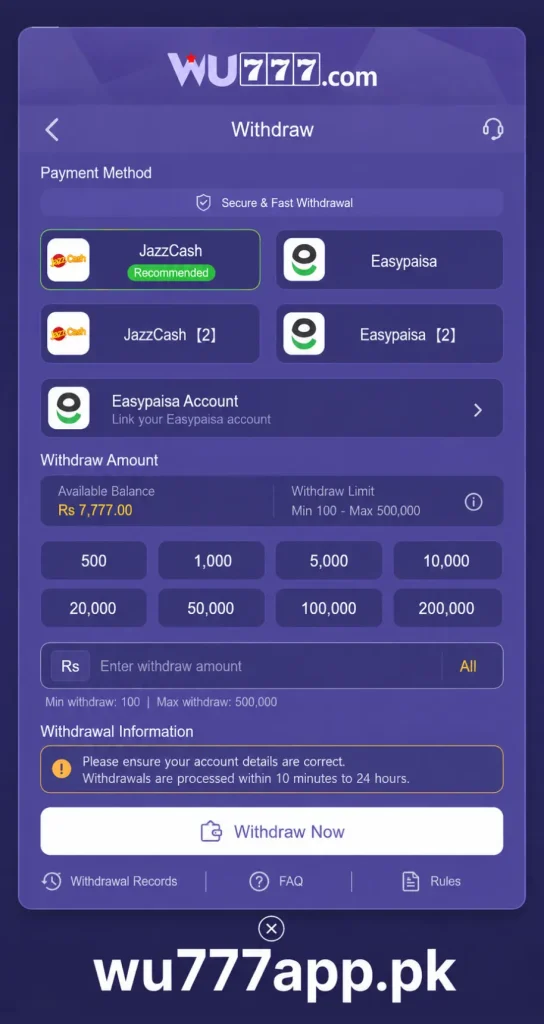
Wu777 may provide different transaction options depending on the current availability of its payment system. For Pakistani users, methods such as Easy Paisa and Jazz Cash can be convenient choices when they are shown as available in the withdrawal section. Always use your own payment account and verify the details before requesting a withdrawal.
Before requesting a withdrawal, make sure your account meets the platform’s withdrawal requirements. Some services may require account verification, a minimum withdrawal amount, or other conditions. It is also important to understand that processing times can vary depending on the selected payment method.
Things Needed for a Withdrawal
- Registered Wu777 Game account
- Correct login details
- Verified payment account
- Available withdrawable balance
- Stable internet connection
Step-by-Step Procedure to Withdraw Money
1- Login to Your Account
Open the trusted Wu777 platform and sign in using your registered mobile number or account details. Make sure you enter the correct password so you can access your account dashboard.
2- Open the Wallet Section
After logging in, go to your account dashboard and find the wallet, balance, or financial section. Select the withdrawal option to see the available transaction methods and withdrawal requirements.
3- Select a Withdrawal Method
Choose the payment method you want to use for receiving your money. Pakistani users may see options such as Easypaisa or JazzCash, depending on what is currently supported. Select the method that belongs to you and check its details carefully.
4- Enter Your Payment Details
Provide the required account or wallet information for your selected payment method. If you are using Easypaisa or JazzCash, make sure the mobile number and account details are correct before continuing.
5- Enter the Withdrawal Amount
Type the amount you want to withdraw into the required field. Check the minimum and maximum withdrawal limits displayed by the platform before submitting your request.
6- Review Everything Carefully
Take a moment to check the withdrawal amount, payment method, wallet number, and other requested information. Correct details are important because mistakes can result in delays or payment being sent to the wrong account.
7- Confirm the Withdrawal Request
After checking all the information, submit the withdrawal request. If an OTP or additional verification step is required, complete it through the appropriate official channel. You can then check your account or transaction history for the current status.
Tips for a Smooth and Secure Withdrawal
1- Use Your Own Payment Account
Always use a payment account registered in your name when possible. Avoid using another person’s Easypaisa or JazzCash account because payment rules may restrict third-party withdrawals.
2- Check the Minimum Limit
Before submitting a request, look at the withdrawal limit shown on the platform. If your requested amount is below the minimum requirement, the transaction may not be accepted.
3- Enter Correct Details
Double-check your Easypaisa or JazzCash mobile number and other payment information. One incorrect digit can create unnecessary problems with the transaction.
4- Keep Your Transaction Record
Save the withdrawal confirmation, transaction ID, or screenshot after submitting your request. Having these details can make it easier to follow up if the payment takes longer than expected.
5- Be Patient During Processing
A withdrawal may not always arrive immediately. Processing time can depend on the platform and payment service. Avoid submitting multiple withdrawal requests simply because the first one has not arrived yet.
Common Withdrawal Problems and Solutions
1- Withdrawal Request Is Rejected
A withdrawal may be rejected if the account does not meet the required conditions, the amount is outside the allowed limit, or the payment details are incorrect.
Solution:
- Check the withdrawal requirements.
- Confirm the requested amount is within the allowed limit.
- Review your payment information.
- Complete any required account verification.
2- Money Has Not Arrived
Sometimes the withdrawal request is accepted but the money does not immediately appear in your Easypaisa or JazzCash account.
Solution:
- Wait for the stated processing period.
- Check your payment account again.
- Review the transaction status in your Wu777 account.
- Keep your transaction reference available if you need support.
3- Incorrect Easypaisa or JazzCash Details
Entering an incorrect mobile number or wallet detail can cause a payment issue.
Solution:
Carefully compare your payment details before confirming the withdrawal. If the request has already been submitted, avoid creating another request immediately and contact the relevant support service for guidance.
4- Withdrawal Option Is Missing
Sometimes a withdrawal method may not be displayed because of temporary maintenance, account restrictions, or changes in payment availability.
Solution:
Check the withdrawal section again later and review any notices provided by the platform. Do not use unofficial payment links or third-party services claiming to process withdrawals for you.
Key Benefits of Wu777 Withdrawal
- Users can request withdrawals directly from their account wallet.
- Easypaisa and JazzCash can provide familiar payment options for Pakistani users when available.
- Digital transactions can make receiving funds more convenient than cash-based methods.
- Users can review their transaction status through their account.
- Keeping payment records can make it easier to track withdrawal requests.
Conclusion
Withdrawing money from Wu777 Game is a simple process when your account and payment information are ready. Log in to your account, open the withdrawal section, choose an available method such as Easypaisa or JazzCash, enter the required information, and carefully review the request before confirming it.
If your withdrawal is delayed, first check the transaction status and allow the required processing time. Keep your transaction details available if you need assistance. Most importantly, use your own payment account, avoid sharing passwords or OTPs, and only use trusted payment information when requesting a withdrawal.
Frequently Asked Questions
1- Is the Wu777 withdrawal process difficult?
No, the basic withdrawal process is easy to follow. You need to access your account, open the withdrawal section, select an available payment method, enter the amount, and confirm the request.
2- Can I withdraw money through Easypaisa?
If Easypaisa is displayed as an available withdrawal option in your Wu777 account, you can select it and provide the required wallet information. Always check the payment details before confirming the transaction.
3- Does Wu777 support JazzCash withdrawals?
JazzCash may be available as a transaction method for Pakistani users. Check the withdrawal section of your account to see whether the option is currently available before submitting a request.
4- Why is my withdrawal taking longer than expected?
Processing can take time depending on the platform and selected payment service. Check your transaction status first and wait for the stated processing period before taking further action.
5- What should I do if I enter the wrong payment details?
If you notice the mistake before confirming the request, correct the information immediately. If the withdrawal has already been submitted, keep the transaction details and contact the appropriate support service for assistance.